What a cute idea...I think I'll use it for evelynn's 1st birthday! I promise I will get lots of pictures up soon!
Paper Cake boxes

7.17.2010


6.09.2010
Creative ideas
I've been making these notebooks...because I just love the idea of having a cute notebook to write down all your many fabulous ideas!
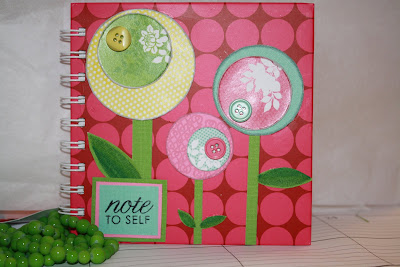
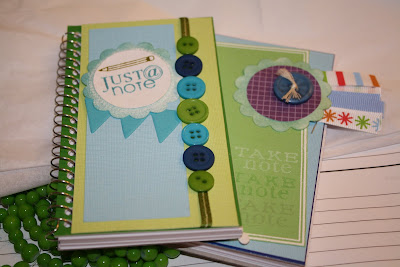


Supplies: house of 3, spring junque, mead notebook, DCWV paper stacks, random buttons, PTI note stamps,
American craft ribbon, random ribbon, tim holtz distressing ink - broken china, bazzil cardstock - just the edge
RS Service Auction
We had a service auction at our church. Basically, a bunch of the ladies perform a service for the other ladies in the ward. I couldn't make it, but I made some stuff anyways. Hope who ever got it liked it!


5.27.2010
Silhouette helps
I keeping finding more uses for my Silhouette. But I wanted to share the things I've realized while I've been creating:
1. If you want to print your design (like as a preview before you make something), make sure you've gone into Output Settings and chosen "Print Cut Lines." I don't know how many times I've messed this up...so I'm telling everyone I know!
2. If need to change the document size, you can specify the size in Document Settings under the Edit menu. I didn't know you could do this until I found out the hard way when I was trying to cut vinyl and heat transfer paper and my letters got cut off. I probably missed that somewhere in the tutorial help...so this is my help to others. You can also save the User Settings so you don't have to mess with it every time.
3. Sometimes when my paper hasn't been sticking to the carrier sheet and a piece gets caught in the machine, it makes this awful noise. Usually I just quickly turn it off. Does anyone else have a better suggestion on how to not let this happen?
4. Also, I cheat and use tape to stick down stuff on my carrier sheet. Seems like it loses it's stickiness quite fast. I'm cheap...what can I say?
Does anyone else have some tips they would like to share? Please do!
1. If you want to print your design (like as a preview before you make something), make sure you've gone into Output Settings and chosen "Print Cut Lines." I don't know how many times I've messed this up...so I'm telling everyone I know!
2. If need to change the document size, you can specify the size in Document Settings under the Edit menu. I didn't know you could do this until I found out the hard way when I was trying to cut vinyl and heat transfer paper and my letters got cut off. I probably missed that somewhere in the tutorial help...so this is my help to others. You can also save the User Settings so you don't have to mess with it every time.
3. Sometimes when my paper hasn't been sticking to the carrier sheet and a piece gets caught in the machine, it makes this awful noise. Usually I just quickly turn it off. Does anyone else have a better suggestion on how to not let this happen?
4. Also, I cheat and use tape to stick down stuff on my carrier sheet. Seems like it loses it's stickiness quite fast. I'm cheap...what can I say?
Does anyone else have some tips they would like to share? Please do!
4.19.2010
Frames
I've had this since last May. Sadly, it has taken me almost a year to realize all the fabulous things you can make with it.
What can you do with some paint, a wood frame, and some dies made from the Silhouette??

Why this of course!


I guess my pictures are kind of blurry. Sorry! I'm still trying to get better at that. We're making these for Achievement Days. I really hope the girls like my stenciling! It was so easy with my Silhouette.
You can buy these cool background files and they can be used for anything you can think of. I also figured out how to cut a border around the "I love you" (courtesy of House of 3 designs). I think they turned out great!
What do you guys think?
What can you do with some paint, a wood frame, and some dies made from the Silhouette??

Why this of course!


I guess my pictures are kind of blurry. Sorry! I'm still trying to get better at that. We're making these for Achievement Days. I really hope the girls like my stenciling! It was so easy with my Silhouette.
You can buy these cool background files and they can be used for anything you can think of. I also figured out how to cut a border around the "I love you" (courtesy of House of 3 designs). I think they turned out great!
What do you guys think?
3.21.2010
Shabby Apple
Even though I can't be there...thought I would share the news
Shabby Apple Trunk Show
Enjoy! Look for some sweet dresses for me
Shabby Apple Trunk Show
Enjoy! Look for some sweet dresses for me
3.19.2010
Digital Design
I've been very inspired by the ladies over at house of 3. I recently bought these awesome digital brushes to use on my crafting/photo editing/scrapbooking. I've also been using some of their aging/sanding/inked edged brushes as well. This was first try, but I thought it turned out ok. What do you think?
 I'm trying to get comfortable using brushes and such. I think it's pretty cool all the things you can do nowadays!
 I'm trying to get comfortable using brushes and such. I think it's pretty cool all the things you can do nowadays!
Subscribe to:
Posts (Atom)